Xcode SDK Update Fixer
Follow this guide to get the best out of Unreal Engine 5 plugin Xcode SDK Update Fixer.
Fab Link:
Video Tutorial:
The Xcode SDK Update Fixer plugin supports Mac and Windows!!!
1. Description
Stop fighting SDK version errors every time Xcode updates.
Xcode SDK Update Fixer is a lightweight Unreal Engine 5 plugin that automatically brings the engine's iOS/tvOS SDK configuration in line with the version you actually have installed. No source builds, no config digging, no manual edits. Enable the plugin, set your target version, and it handles the rest on startup.
Which errors does this fix?
If you have seen any of these messages, this plugin is for you:
* "The SDK for IOS is not installed properly, which is needed to generate data." — the classic iOS packaging error when UE refuses to recognize your installed Xcode/SDK.
* "SDK version issue. This app was built with an older SDK. All iOS and iPadOS apps must be built with a newer SDK or later." — the App Store Connect validation failure when Apple requires a newer SDK than your UE version officially supports.
* "Validation failed: SDK version issue" — the same rejection during upload to TestFlight or App Store Connect.
Xcode version mismatch / MaxVersion errors after upgrading Xcode while staying on an older UE version.
What does it actually do?
When the plugin loads, it:
1.Reads the engine's current iOS SDK version setting.
2.Replaces it with your configured target version.
3.Applies the change cleanly — nothing else in your engine setup is altered.
The update is version-agnostic: it does not rely on a hardcoded old value. It detects whatever SDK version is currently configured and updates it to the one you choose. That means it keeps working across different UE 5.x versions and different starting values — and stays current as new Xcode releases arrive.
Who needs this?
* iOS/tvOS developers who updated Xcode but are stuck on an older UE version that does not officially support the new SDK yet.
* Teams using remote builds on Windows or Mac who cannot wait for an official Epic patch.
* Anyone tired of manual config edits every time Apple releases a new Xcode version.
Requirements
* Unreal Engine 5 (editor module, tested on UE 5.x).
* Write access to the engine installation folder (the plugin applies its fix to the engine's configuration).
* The target Xcode/SDK version must actually be installed on your Mac for builds to succeed — this plugin removes the version gate, it does not install Xcode for you.
2. Get Started
Enable the Xcode SDK Update Fixer plugin.

Restart the engine.

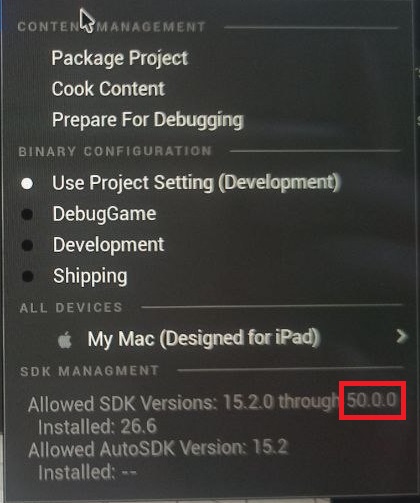
If the Xcode version hasn't changed after restatring, you need to restart the engine again.
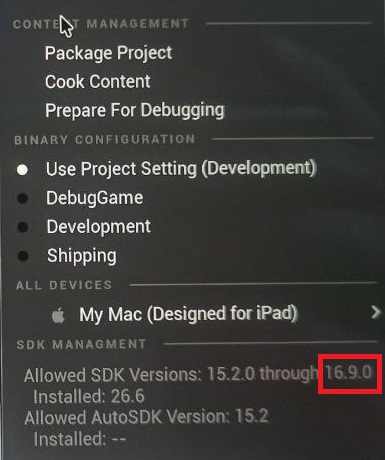
After a second reboot, you will activate the improvements in Xcode version 50.0.0.
Support Plugin
If you have any questions or concerns about Xcode SDK Update Fixer, please contact us with title "Xcode Fixer question":
Email: volihan.designer@gmail.com